Your projects and coding agents in one window.
FliskOS shows every Flisk project on your Mac, starts and stops its stack, and runs Claude Code, Codex and others right next to it. It runs on your machine and holds no keys or accounts.
Do this:
- Open Terminal: press ⌘ Space, type Terminal, press Enter.
- Paste with ⌘ V and press Enter. The app installs and opens.
curl -fsSL https://os.flisk.si/install.sh | sh
Run it again any time to update. macOS blocks apps downloaded in a browser that Apple has not approved, so the app installs from Terminal instead. Read the script.
Prefer the zip?
Download FliskOS-macOS.zip. After you move it to Applications, run this once:
xattr -cr /Applications/FliskOS.app
Needs the Flisk CLI and Node.js 22.12+ or Bun.
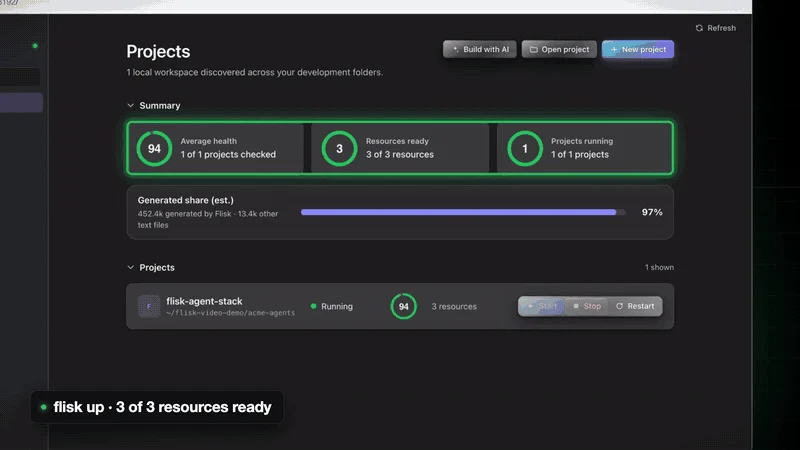
Every project, at a glance
Health, resources, logs, endpoints and port conflicts for every Flisk project it finds. Start, stop or restart a project, a stack or one resource, and open its folder or a terminal.
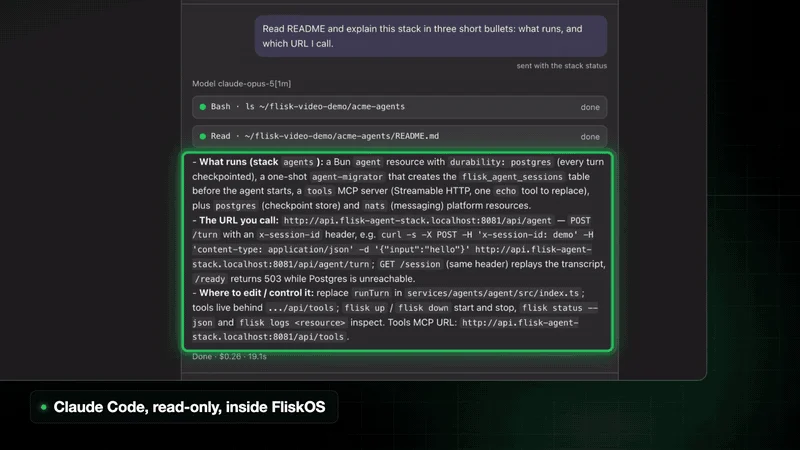
Your agents, inside the project
Start a thread in a project, follow what the agent does, and reply in the same place. Each agent uses the login you already have, and up to four work at once.
| Agent | Read only | Edit files |
|---|---|---|
| Claude Code | Plan mode | Accepts edits; commands follow your Claude Code settings |
| Codex | Read-only sandbox | Workspace sandbox with no network |
| Cursor Agent | Plan mode | Edits; commands follow your Cursor settings |
| Grok Build | Edits and commands refused | Edits allowed, commands refused |
| fx | Edits and commands refused | Edits allowed, commands refused |
The Flisk apps, pointed at your project
Links open in your browser and commands are copied, never run.
Pages
An agent builds a one-page explainer of your stack, and you get the command that publishes it.
Citable
Copy the command that checks each running frontend for AI search.
Helpdock
Open the help center for the project's GitHub repository.
And more
Command Comparer, the DevEx Roadmap and Demos, one click away.
Local, and only local
- The server binds only to
127.0.0.1, with a random token for each session. - It never asks for an API key. There is no account and no hosted control plane.
- A native window of about 1 MB, not Electron.
- MIT licensed. Read the source.
What you need
FliskOS drives the Flisk CLI, so install that first. The script never runs sudo.
curl -fsSL https://flisk.sh/install.sh | sh
Then install FliskOS. You also need Node.js 22.12+ or Bun on your login shell's PATH.
curl -fsSL https://os.flisk.si/install.sh | sh
On Linux or from a checkout, run it with Node or Bun.